
Proper handling of the Bartels BP7 micropumps is essential to ensure their optimal performance and longevity. These piezoelectric micropumps, developed by Bartels Mikrotechnik, represent a breakthrough in microfluidic technology, providing a compact, efficient, and reliable solution for managing liquids and gases. However, to fully unlock their potential and prevent common operational issues, users must follow specific guidelines regarding installation, commissioning, operation, and maintenance.
Bien que le manuel du BP7 fournisse des informations précieuses, certains conseils et instructions cruciaux (🚨) peuvent être négligés lors d'une lecture rapide. Dans cet article de blog, nous mettrons en évidence ces aspects importants (conseils mécaniques, électriques, fluidiques et logiciels), offrant des conseils pratiques pour vous aider non seulement à respecter les instructions générales, mais aussi à résoudre certains problèmes.
⚙️ Mechanical Instructions for the BP7 Micropump
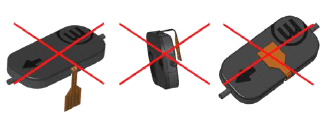
Manipulation du câble flexible
🚨 The BP7 micropump’s flex cable is delicate and should be handled with care. Avoid bending or twisting it, especially around sharp edges, to prevent damage. Secure the micropump and plug connection to reduce mechanical stress from vibrations.
🚨 The connector is rated for about 30 connection/disconnection cycles, so replace it regularly to ensure reliable performance.
🚨 Ne modifiez pas le câble flexible, car cela pourrait compromettre la fonctionnalité et annuler la garantie.
Compatibilité des pompes
🚨 The BP7 micropump’s performance may be affected by the absorption of liquid molecules, which can alter the mechanical properties of its internal components. While this change can impact the pumping process, it is important to note that the effect is reversible, and the pump is not permanently damaged.
Le tableau ci-dessous présente la compatibilité de la pompe avec différents liquides après des mesures à long terme de deux semaines à 250Vpp/100Hz.
| Substance chimique | Concentration (%) | Compatibilité chimique du PPSU |
|---|---|---|
| Acide acétique | 100 | F |
| Acétone | 100 | X |
| Essence de nettoyage | 100 | F |
| Éthanol | 100 | X |
| Acétate d'éthyle | 100 | X |
| Glycérine | 60 | E |
| Isopropanol | 100 | F |
| Méthanol | 100 | X |
| Hydroxyde de sodium | 0.2 | E |
| Vacuum pump oil | 100 | G |
E = Excellent ; Peu ou pas d'effet.
G = Bon ; Aucune perte sérieuse de propriétés.
F = Moyen ; Quelques effets négatifs, certaines propriétés utiles conservées.
X = Mauvais ; Attaque sévère ou rupture.
Compatibilité chimique du PPSU
The BP7 micropump body, made from PPSU (Polyphenylsulfone), offers excellent resistance to diluted acids, alkali solutions, and many organic solvents. However, it is less resistant to concentrated acids and ketones. For detailed chemical compatibility, refer to our comprehensive guide.
⚡ Electrical Instructions for the BP7 Micropump
Précautions de connexion et de manipulation
Misconnection or improper handling can result in pump or electronics failure. Therefore, it is essential to maintain a secure connection between the micropump and the board connector.
🚨 Lors de la fixation du driver de pompe (mp-Lowdriver, mp-Highdriver, mp-Highdriver4, mp-Driver, mp-Valvedriver), alignez le point blanc situé dans le coin supérieur gauche du driver avec le marqueur blanc sur la mp-Multicarte2 pour localiser correctement la broche 1.
🚨 Handle the pump driver carefully when removing it to avoid bending the pins and affecting functionality.
🚨 Limit the wire length between the controller and the pump to a maximum of 1 meter to ensure optimal performance.
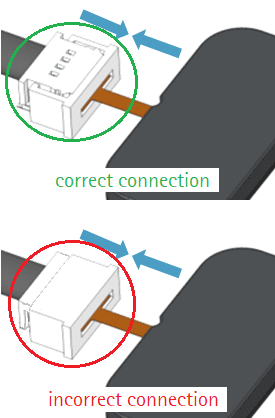
🚨 Insert the pump cable with the contact surfaces facing down into the plug; incorrect orientation will prevent the pump from functioning. Secure the connection by closing the white plug. To disconnect, open the Molex connector first.
Protection contre les facteurs environnementaux
🚨 Assurez-vous que la terre est correctement mise à la masse avant d'appliquer la tension d'alimentation pour éviter tout dommage, car les puces de driver sont sensibles aux décharges électrostatiques.
🚨 Évitez de toucher les commandes pendant le fonctionnement, car elles fonctionnent à des tensions élevées, et tout contact peut entraîner des blessures ou des dommages matériels.
🚨 Prevent any contact between the micropump’s flex cable, connectors, or electronics with liquids or moisture, as this may lead to short circuits and pump failure.
Gestion de l'alimentation et de la température
🚨 If more current is required, connect an external power supply through the USB-C connector.
🚨 Assurez-vous que la plateforme Highdriver fonctionne en dessous de 160 °C pour éviter qu'elle n'entre en mode non opérationnel.
🚨 Utilisez brièvement des signaux rectangulaires à fronts raides pour éviter une contrainte mécanique excessive sur les piézo-actionneurs, ce qui peut entraîner une défaillance de la pompe.
💻 Software-Related Instructions for the BP7 Micropump
Channel Detection and Activation
After successfully installing the USB driver, the Multiboard2 App will automatically detect the connected driver and enable the appropriate channels:
- Highdriver4 : Active les canaux CH1 à CH4.
- mp-Highdriver: Allows control of channel CH5 only.
- mp-Lowdriver: Allows control of channel CH5 only.
- mp-Driver: Enables channel CH6 only.
🚨 Par exemple, lors de l'utilisation du Lowdriver pour contrôler une pompe BP7, cette pompe doit être connectée au CH5 sur la Multicarte2.
USB Driver Installation (Windows)
🚨 If your PC does not automatically recognize the ESP32 microcontroller, you will need to install the USB driver manually. Follow these steps:
- Visitez le site web de Bartels et accédez à la section Téléchargements.
- Téléchargez le fichier mp-Multicarte2_usb_Pilote.zip.
- Décompressez le fichier et faites un clic droit sur le fichier d'informations d'installation silabser.inf.
- Sélectionnez Installer dans le menu contextuel pour installer les pilotes sur votre appareil.
💧 Fluidic Instructions for the BP7 Micropump
Tubing Connection
🚨 Connect suitable tubes to the inlet and outlet of the BP7 micropump. Bartels Mikrotechnik recommends using Tygon LMT-55 for water-based solutions or F4040 for solvents, both with an inner diameter (ID) of 1.3 mm and an outer diameter (OD) of 3 mm.
Connexions parallèles et en série
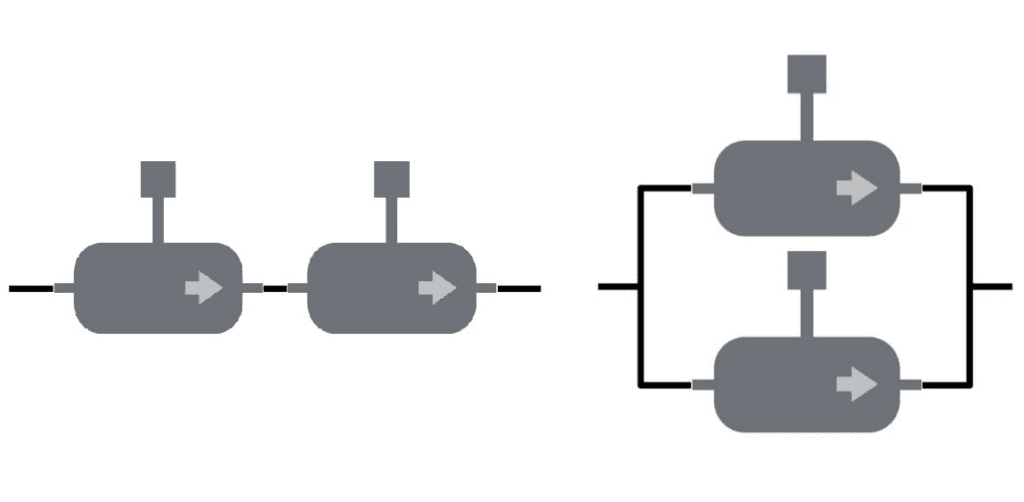
🚨 Configurez les micropompes BP7 en connexions parallèles ou en série selon les exigences de l'application :
- For higher throughput, connect multiple pumps in parallel to increase the total flow rate.
- Pour les applications nécessitant une pression élevée, connectez les pompes en série afin d'augmenter la pression maximale du système.
Cleaning the Micropump
🚨 To thoroughly clean the BP7 micropump, use Isopropyl alcohol (IPA). You can either draw IPA through the system using a syringe from the outlet or run the micropump with IPA or ethanol for several minutes. After cleaning, flush the micropump with distilled water to remove any residual alcohol from the pump channels and chambers.
🚨 Toujours rincer dans le sens de fonctionnement de la pompe, car une pression négative à la sortie est préférable à une pression positive à l'entrée.
🚨 Always rinse or fill the BP7 micropump from the outlet (suctioning) to avoid exceeding the maximum pressure of 1 bar, which can cause pump malfunction.
🚨 Handle the micropump in a clean environment and use filters to prevent contamination. Ensure only liquids with particle sizes smaller than 50 μm are pumped, as larger particles can impair functionality.
Priming the Micropump
🚨 To prime the BP7 micropump for transporting liquids and gases:
- Start with the highest voltage and a frequency of at least 300 Hz to remove air from the system. Once the liquid reaches the micropump, reduce the frequency to 100 Hz for optimal performance.
- Pour l'amorçage manuel, appliquez une pression négative à la sortie à l'aide d'une seringue ou connectez une pompe externe (par exemple, une seconde BP7) pour amorcer la première BP7.
Conclusion
Handling the BP7 micropump with care is key to getting the best out of it. By paying attention to the tips and instructions—whether it’s making secure connections, keeping the pump clean, or setting it up correctly—you’ll ensure smoother operation and a longer lifespan. Simple steps can make a big difference. With these practical tips, you can avoid common issues and get the most from your BP7 micropump in any application.
For a more detailed overview of the BP7 micropump, its full range of features, and system components, check out our Bartels BP7 overview blog. You’ll also find other helpful guides in this series, including detailed posts on topics like the mp-Multiboard2 and mp-Drivers, and more about controlling the BP7 with the Multiboard2 App.
📧 If you have any questions or feedback, please feel free to contact us at support@darwin-microfluidics.com.